

Stringify-Web: Adobe Analytics s.products string
ADOBE ANALYTICS

A guide to parsing and visualizing Adobe Analytics product strings
If you work with Adobe Analytics, you’ve probably dealt with the infamous s.products variable. It’s powerful, but it’s also:
Hard to read
Error‑prone to debug
Time‑consuming to QA, especially across multiple scenarios
If so, say hello to Stringify, a web-based helper tool that parses Adobe Analytics product strings and turns them into a clean, visual table you can quickly review, export, and share.
Link : https://app.shiftlytic.ca/stringify
What Stringify Does
It focuses on making Adobe Analytics product data easy to understand.
Parse s.products strings into a readable table.
Show the validation result of malformed string.
Import multiple hits at once from an Adobe Analytics network export (Excel)
Export parsed results to Excel or as an image for documentation

When to Use Stringify
Stringify is ideal for:
QA engineers validating Adobe Analytics implementations on eCommerce sites
Analysts or developers debugging s.products issues
Anyone who needs to:
- Understand what’s in the product string
- Confirm quantities, prices, and merchandising variables
- Quickly verify that the right events and page/link context are present
Sample data
Here is the sample data (values inside the double quotes ) you can use to try the Stringify tool :
MISSING REQUIRED FIELD - Product Name
s.products = "Electronics;;2;1999.99";
INCORRECT DELIMITER USAGE
s.products = "Electronics,Laptop,2,1999.99";
INVALID QUANTITY FORMAT
s.products = "Electronics;Laptop;ABC;1999.99";
INVALID PRICE FORMAT
s.products = "Electronics;Laptop;2;ABC";
INVALID eVAR FORMAT
s.products = "Electronics;Laptop;2;1999.99;;eVar=Value";
INVALID EVENT FORMAT
s.products = "Electronics;Laptop;2;1999.99;event";
STRUCTURAL ERRORS
s.products = "Electronics;Laptop;2;1999.99;;;";
MULTI-PRODUCT ERRORS
s.products = "Electronics;Laptop;1;999.99,Category2;;2;499.99
Feedback
Whether you have a brilliant idea, a suggestion for a feature, spotted a bug or just want to share what you love, we're all ears.
Your feedback directly helps us build a better tool for you!
Use the feedback button on the right side of the tool to share your thoughts.
If you include your email address, we can contact you for more details if necessary.
Getting Started with the Main Interface
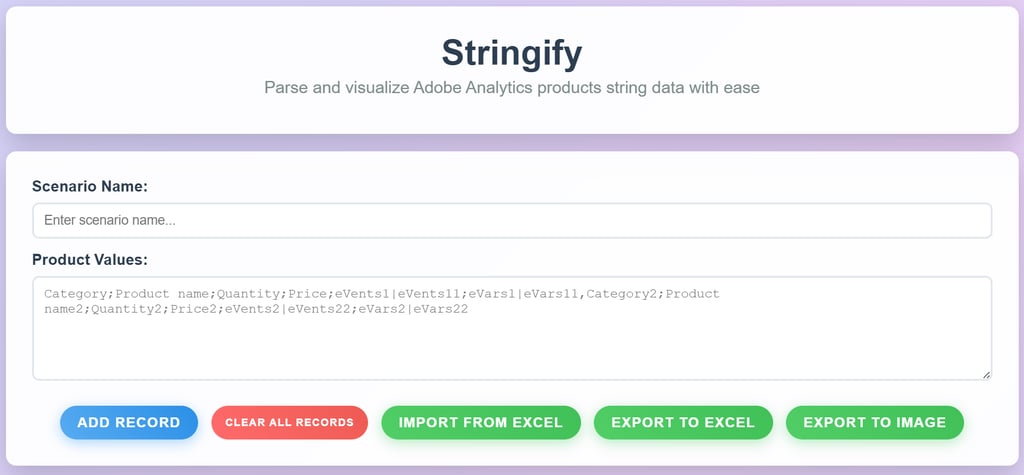
Scenario Name : helps you identify what this particular hit or set of products represents.
You can type it manually (e.g., “Product Detail – PDP Load – Shoes”)
Or let Stringify generate it automatically when you use Import from Excel (details in section 3)
Product Values : This is where you paste the raw s.products string from Adobe Analytics.
Example : Category1;Product name1;1;29.99;event1=1|eVar51=value1,Category2;Product name2;2;49.99;event2=1|eVar52=value2
Stringify will split multiple products separated by commas and each value separated by semicolon
Add Record : Once you’ve entered Scenario Name, - Product Values (s.products string) Click 'Add Record'.
Stringify will create a new scenario under “Parsed Records” and display the parsed output in tabular form.
Clear All Records : Clear All Records removes all scenarios currently shown in “Parsed Records.”
Use this when you want to start a fresh QA session.
Importing from Excel : This is to help QA users who don’t want to manually copy/paste each scenario and s.products value.
Instead of copying each hit, you can:
- Export Adobe Analytics network requests as Excel using Adobe Experience Platform Debugger extension.
- Feed that Excel file directly into Stringify
Viewing Parsed Records: Each row represents a single product from the s.products string.
If a single hit contains multiple products, they will appear as multiple rows under the same scenario.
You can also delete an individual scenario using the “Delete Record” button next to it.
Validation checks are performed on parsed records to identify any missing mandatory fields or malformed product strings.
Exporting Your Results: Once you’re satisfied with your parsed data, you typically want to save or share it with developers, analysts, or stakeholders.
Stringify supports Export to Excel or Image

15+ years of IT work experience as Technical delivery Lead, Analytics Architect, AEP/CJA Implementation Consultant.
Adobe certified expert in Adobe Analytics, Adobe Target, Adobe Experience Platform (AEP), Real-Time Customer Data Platform (RT-CDP), Customer Journey Analytics (CJA), Journey Optimizer (AJO). Well versed with Google Analytics Server-side, Conversion API (CAPI), Privacy & Consent Management (OneTrust).
Deputed to Canada, USA, Netherlands, Germany, UK to work closely with business clients, business analysts, solution architects, solution designers, and other key stakeholders. Passionate to decode the online consumer behaviour by using an analytics data-driven approach.


From Strategy to Execution,
Your Consulting Partner
Connect: connect@ShiftLytic.ca
Shiftlytic © 2026. All rights reserved.
location: USA, CANADA, INDIA
consulting SERVICES
mARTECH