

Styler, the Instant Text Formatter
OTHERS
Pradeep Jaiswal
2/7/20262 min read

Key Features and Styles
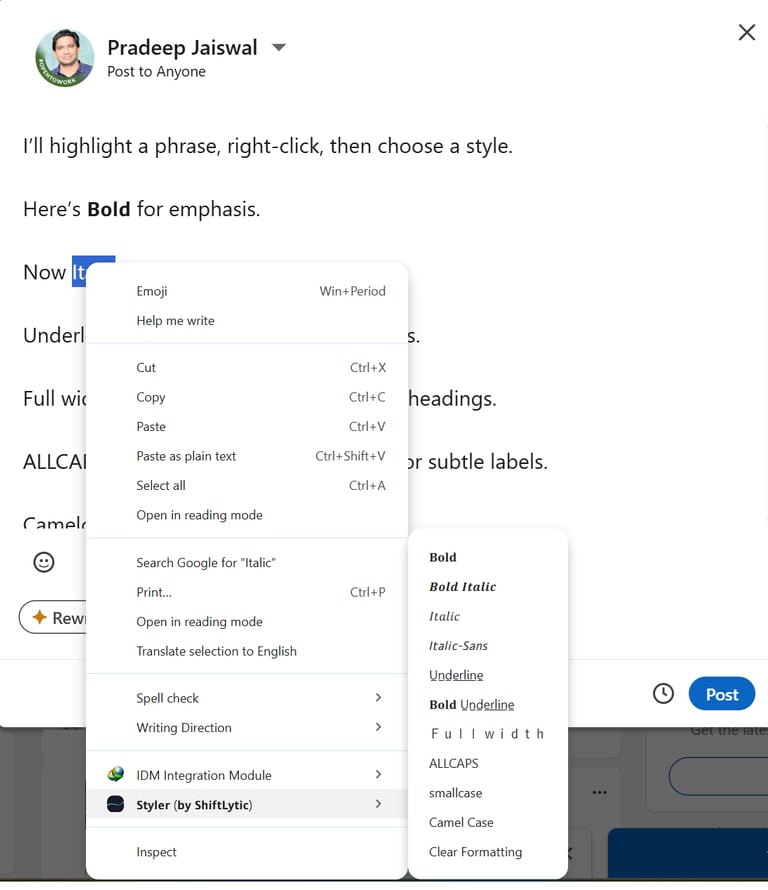
With just a simple right-click on any highlighted text, you can apply several professional transformations:
Bold: Perfect for making important points or hooks stand out clearly.
Italic: Adds a sleek, slanted look for subtle emphasis or quotes.
Bold Italic: Combines both for maximum impact and high-level attention.
Underline: Ideal for highlighting key information or notes.
Full-width: Stretches your text for a unique, modern, and spaced-out feel.
Case Transformations: Instantly switch between ALL CAPS for announcements, lowercase for minimal labels, and Camel Case for clean titles.
Clear Formatting: Changed your mind? One click resets your text to its original style.
Level up your writing : Meet Styler, the Instant Text Formatter
Have you ever noticed how a wall of plain gray text on LinkedIn or other social media platforms can be easily ignored? In a digital landscape where attention is the most valuable currency, how you present your words matters as much as the words themselves.
Introducing Styler (by ShiftLytic) - a powerful Chrome extension designed to help you break free from the limitations of standard text editors without ever leaving your browser.
Link : https://chromewebstore.google.com/detail/styler-by-shiftlytic/
Why You Need Styler
Most social media platforms, like LinkedIn, don't natively allow for advanced text formatting. This often leads to "wall-of-text" fatigue for your readers. Styler solves this by giving you instant access to a variety of Unicode-based styles that work across different digital platforms.
Whether you are a content creator looking to grab attention with a bold hook or a professional wanting to organize key points, Styler provides the tools to make your message stand out.
How It Works
Styler is designed to be fast and intuitive. You don't need to switch between tabs or copy-paste from external websites.
Highlight any text on a webpage.
Right-click to open your context menu.
Choose your desired style from the Styler menu.
Your text is instantly transformed.
A Privacy-First Experience
Your security is a priority. Styler is built with a commitment to your privacy:
No Data Collection: The extension does not collect your personal information.
No Tracking or Ads: You can style your text without being followed across the web.
Local Processing: All transformations happen locally in your browser, meaning no data is sent to external servers.
Conclusion
Don't let your insights get lost in a sea of plain text. Whether you're drafting a LinkedIn post, leaving a comment, or taking notes on a webpage, Styler gives you complete control over your text's appearance.
Ready to elevate your digital content? Try Styler today and start formatting your way to better engagement.

From Strategy to Execution,
Your Consulting Partner
Connect: connect@ShiftLytic.ca
Shiftlytic © 2026. All rights reserved.
location: USA, CANADA, INDIA
consulting SERVICES
mARTECH